






3.4
Free
Cygwin
Tools and utilities to emulate Linux in Windows
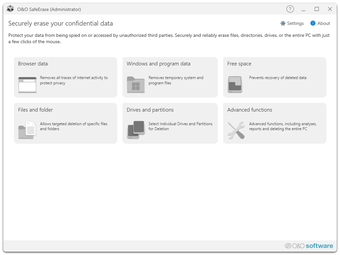
Deleting files, directories, drives or the entire PC – no problem with O&O SafeErase! Your internet traces can also be deleted quickly and securely at the touch of a button. At some point, every user of a Windows PC comes to the point where a hard drive or SSD needs to be deleted or certain documents need to be securely destroyed.
If the computer is sold or given away, personal photos or business information can easily fall into the wrong hands. Because deleting it under Windows does not mean that it is permanently removed. This program allows you to securely destroy and overwrite using recognized procedures so that restoration is no longer possible.
Misuse can have serious consequences, from identity theft to financial loss. Simply “deleting” files is not enough as they can often be recovered. This program ensures that it is irretrievably removed using advanced algorithms that meet the strictest security standards.
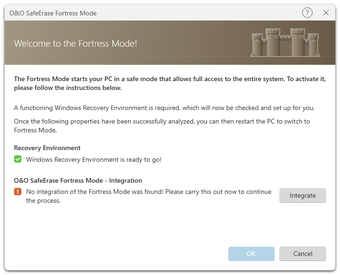
With the Fortress Mode, you can now destroy your sensitive information even more efficiently and securely. To do this, your PC is placed in a locked mode in which no other application can access. This not only makes the process faster, but also safer, as background processes cannot influence the process or even write new sensitive material during the run.
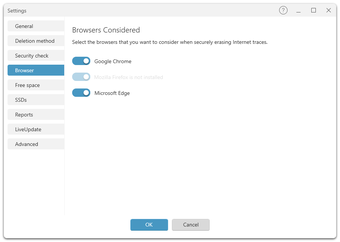
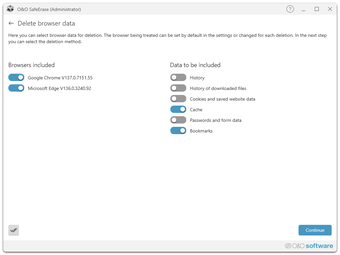
As you surf the Internet, your browser usually silently stores information about your history and actions. This can provide information about websites visited and even access your information. SafeErase supports current browsers and allows you to safely erase their data and therefore your traces.
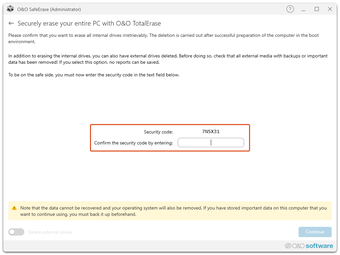
Wiping the entire computer allows you to securely remove everything before selling, giving away, or disposing of the computer. All files, settings, applications and even the operating system are securely shredded so that recovery is not possible. This does not require any additional hardware and is ready to use straight away.
The program offers you the choice between six different deletion methods. These differ in their speed and thoroughness. In addition to standardized procedures from the U.S. Departments of Defense (DoD) and the Federal Office for Information Security (BSI), you can also choose a complex mathematical method (Gutmann method) that meets the highest security requirements. This means it even exceeds the current requirements of the BSI and DoD.
Trial version
21.0.26082
Windows
Windows 10
English
71.86 MB
Have you tried O&O SafeErase Professional Edition? Be the first to leave your opinion!
Add reviewTools and utilities to emulate Linux in Windows
.png)
GoodSync: Efficient File Synchronization Tool
A trial version program for Windows, by Generalia-software.
Log monitor for debugging and administration
Installation development system for .NET and Win32-based setups

An easier way to build applications
Setup package authoring tool for Windows Installer
Create secure multi-version software updates

A free program for Windows, by Tryanderror, Inc.
The easiest way to maintain and update your website
Great installation file toolkit